Understanding Tool Calling: How LLMs Use APIs and Other Systems
A Large Language Model can generate text, organize information, and suggest decisions. However, by itself it cannot load a customer record from a database, send an email, or create a calendar appointment.

Bernd Fischer
26. Aug 2026 · 5 min read
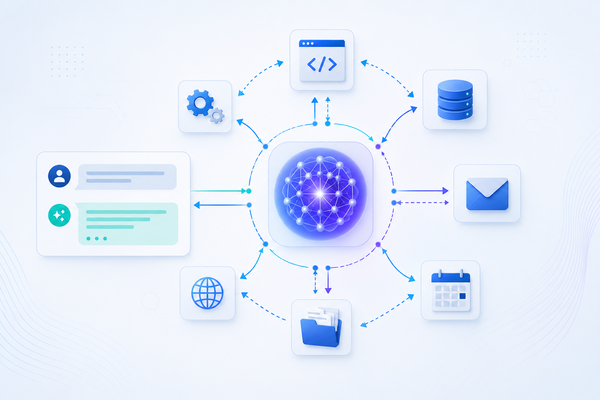
For an LLM to interact with the outside world, it needs tools. This is exactly what Tool Calling is for.
In Tool Calling, the model receives descriptions of the available functions and can decide which tool to call with which arguments. The actual execution remains the responsibility of the application.
The Basic Principle of Tool Calling
Let's take a simple query:
What is the current outstanding invoice amount for customer 4711?
The language model does not know the company's current invoices. Therefore, the application provides it, for example, a tool get_open_invoices.
The process consists of several distinct steps:
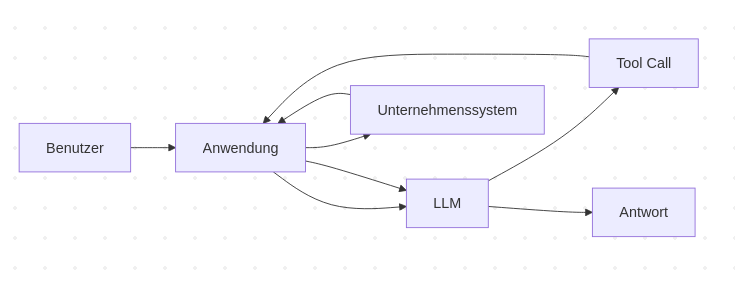
The key is the separation between decision and execution.
The LLM decides that a tool is needed. The application performs the call.
A Tool Is Initially Only a Description
For a model to use a tool, it must know that this tool exists.
An application might have, for example, the following Python function:
def get_open_invoices(customer_id: int) -> list[dict]:
    """Return all open invoices for a customer."""
    ...
However, the Python function alone is not enough for the LLM. It needs a machine-readable description of its interface.
Conceptually, this could look like:
{
    "name": "get_open_invoices",
    "description": "Returns all open invoices for a customer.",
    "parameters": {
        "type": "object",
        "properties": {
            "customer_id": {
                "type": "integer"
            }
        },
        "required": ["customer_id"]
    }
}
This way, the model learns which function exists, what it is meant for, and which arguments it expects.
Many APIs use structures based on JSON Schema for this purpose.
What the LLM Actually Produces
The user asks:
Which invoices are still outstanding for customer 4711?
The model might then produce the following structured output in essence:
{
    "name": "get_open_invoices",
    "arguments": {
        "customer_id": 4711
    }
}
This is not yet an executed function call.
The model has merely generated a structured decision:
I would like to use the tool get_open_invoices
with customer_id=4711.
Only the application interprets this output and calls the corresponding function.
This is a crucial security principle. The LLM does not automatically get access to the database, file system, or company network.
The Application Remains Between LLM and System
A typical architecture looks like this:

The application forms a control layer.
Here, arguments can be validated, permissions checked, and tool calls logged.
This layer should not be bypassed. A language model is not a trustworthy source for function arguments.
Structured Arguments Make Tool Calling Possible
Tool Calling works especially well because the model is not supposed to generate arbitrary text but data according to a given structure.
Suppose a tool creates a support case:
def create_ticket(
    customer_id: int,
    subject: str,
    priority: str,
) -> dict:
    ...
The model might generate something like this:
{
    "customer_id": 4711,
    "subject": "Login doesn't work",
    "priority": "high"
}
These data can then be validated.
For example, with Pydantic:
from typing import Literal

from pydantic import BaseModel


class CreateTicketInput(BaseModel):
    customer_id: int
    subject: str
    priority: Literal["low", "normal", "high"]
Before the actual function is executed:
data = CreateTicketInput.model_validate(tool_arguments)

create_ticket(
    customer_id=data.customer_id,
    subject=data.subject,
    priority=data.priority,
)
This creates an important boundary:
LLM Output
    ↓
Validation
    ↓
Business Logic
    ↓
external System
The model may propose actions. The application decides which of these are actually permitted.
Providing Multiple Tools
Tool Calling becomes more interesting when the model knows multiple tools.
A customer service application could, for example, offer these tools:
get_customer
get_open_invoices
search_documentation
create_support_ticket
send_email
For the question
Which outstanding invoices does ACME Inc. have?
initially get_customer could be necessary, because only the company name is known.
Then the application can pass the result back to the model. The model now knows the customer ID and can then select get_open_invoices.
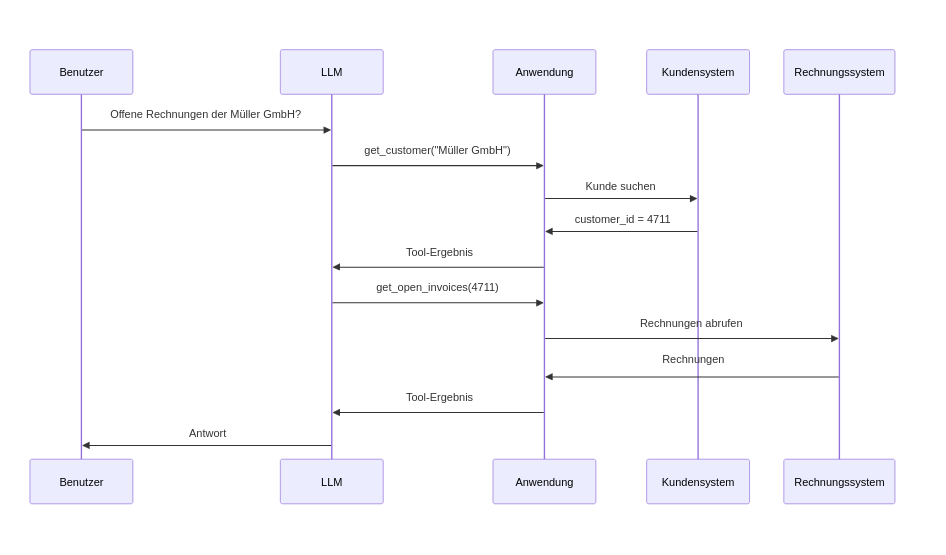
This already approaches the principle of an agent.
The model uses a result to decide the next required step.
Tool Calling and Agents Are Not the Same
The terms are often mixed.
Tool Calling is initially just a mechanism by which a model can request structured calls to tools.
An agent often uses this mechanism within a larger decision-making process.
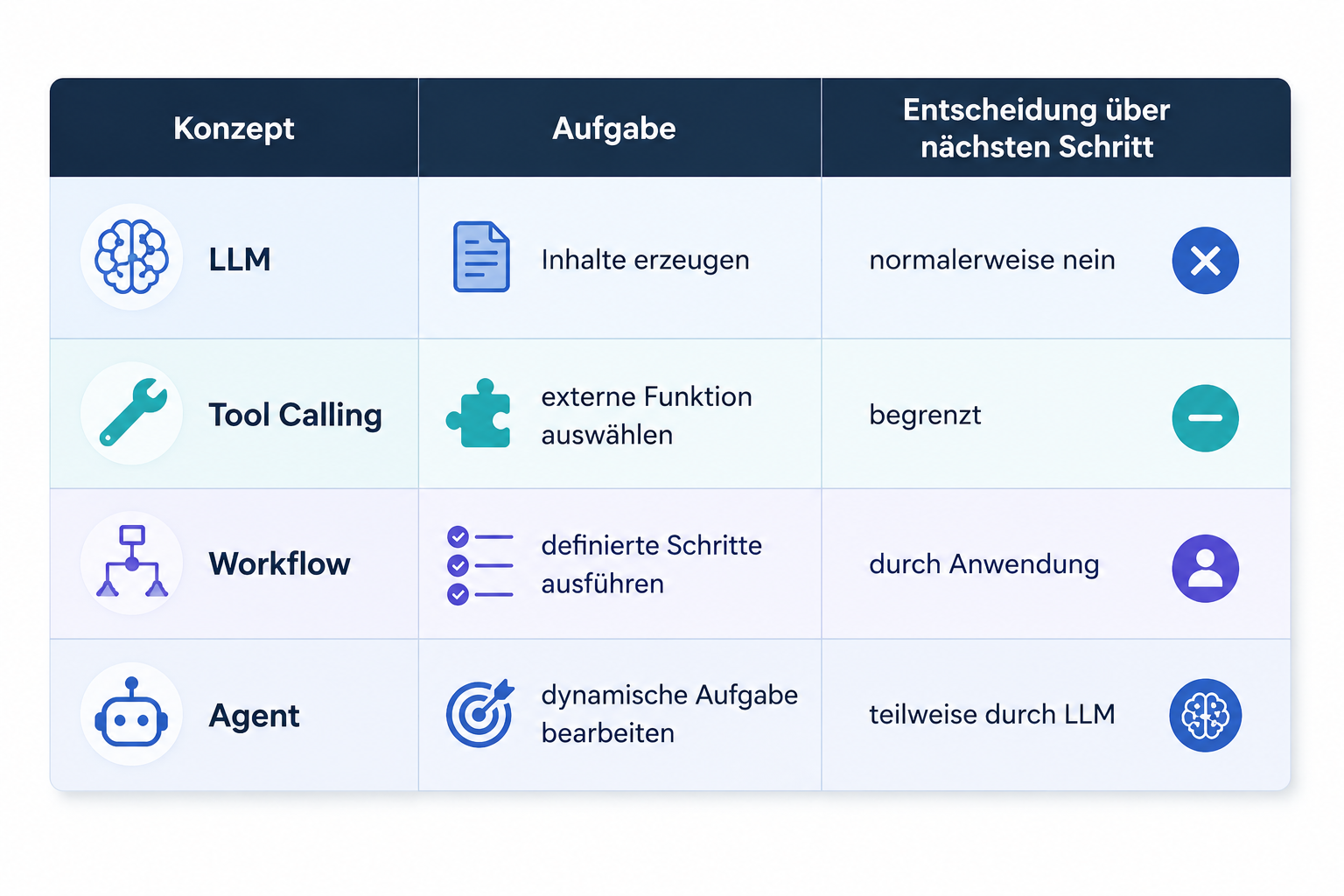
An agent can use Tool Calling. But Tool Calling alone does not automatically make an application an agent.
Reading and Writing Have Different Risks
Not all tools should be treated equally.
A tool like
get_customer(4711)
only reads information.
Another tool could actually change something:
delete_customer(4711)
or:
transfer_money(...)
For productive systems, this distinction is crucial.
A sensible architecture can, for example, classify tools into three risk categories:
READ
Read data

WRITE
Change data

CRITICAL
critical actions
For critical actions, an additional approval might be required.
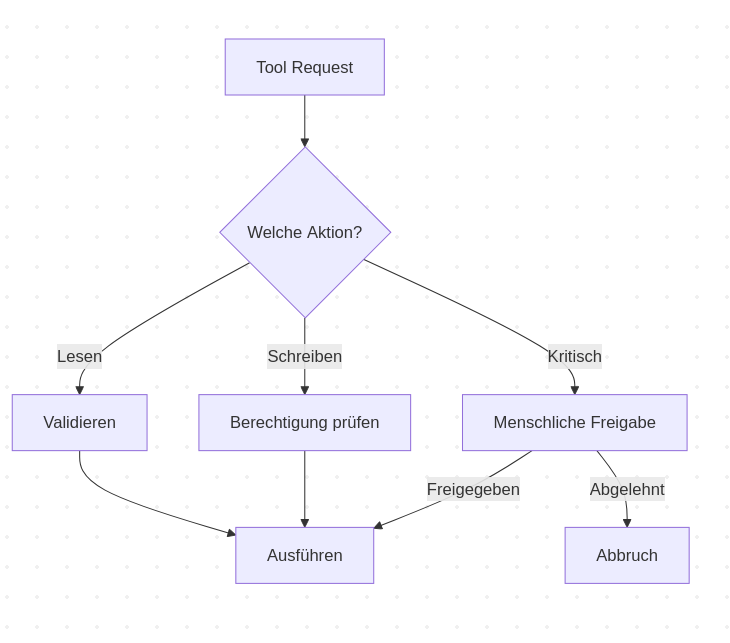
This prevents the LLM from becoming an uncontrolled actor in the system.
Why Generic Tools Can Become Dangerous
A tool could, in theory, be designed to be very powerful:
def execute_sql(query: str):
    ...
This is flexible but gives the model an extremely large scope of action.
Often, specialized tools are better:
def get_customer(customer_id: int):
    ...


def get_open_invoices(customer_id: int):
    ...


def update_customer_email(customer_id: int, email: str):
    ...
This explicitly defines which capabilities the model has.
This follows a well-known security principle: Least Privilege.
A tool should have only exactly the rights necessary for its task.
Tool Results Must Also Be Controlled
Not only the model's arguments must be controlled.
External systems can also deliver unexpected data.
A tool could return a very large data set. An API might fail. A document could contain manipulated instructions or an external system might be temporarily unreachable.
Therefore, the tool layer should also check results.
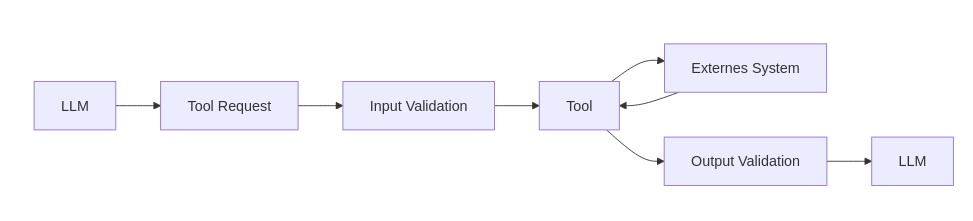
This makes Tool Calling a clearly controlled interface between probabilistic AI and deterministic software.
Errors Are Part of Normal Operation
External systems do not always work.
An API can, for example, respond with a timeout:
get_customer(4711)

→ Timeout
The application should not simply hide this error as normal text.
Instead, the model can receive a structured result:
{
    "status": "error",
    "error": "customer_service_unavailable"
}
Then it can be decided whether a retry makes sense or the task should be aborted.
In agentic systems, it must also be prevented that this leads to endless loops.
Typical protection mechanisms are:
- maximum number of tool calls
- timeouts
- retry limits
- cost limits
- abort conditions
Control over the process should remain with the application.
Tool Calling Is an Integration Architecture
Tool Calling is often seen only as a feature of a language model.
Architecturally it is more interesting to see it as an integration layer.
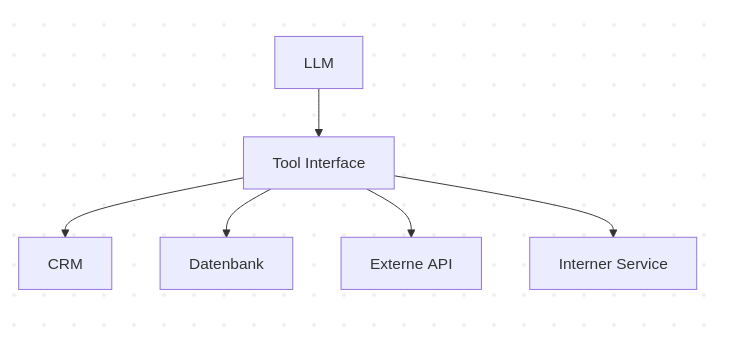
The language model does not have to know how PostgreSQL, a CRM, or an internal backend technically work.
It only needs a well-defined set of tools.
The actual integration remains classic software development.
Where MCP Comes Into Play
At this point, a new problem arises.
If every AI application defines its own tools individually, the same integrations might have to be built multiple times.
One application defines access to a repository, another needs the same access but uses a different interface.
The Model Context Protocol, or MCP for short, attempts to standardize this connection between AI applications and external capabilities more strongly.
MCP does not replace Tool Calling.
Rather, it can provide a standardized way to make tools and other resources available to AI applications.
That is exactly why MCP is the logical next step after understanding Tool Calling.
Conclusion
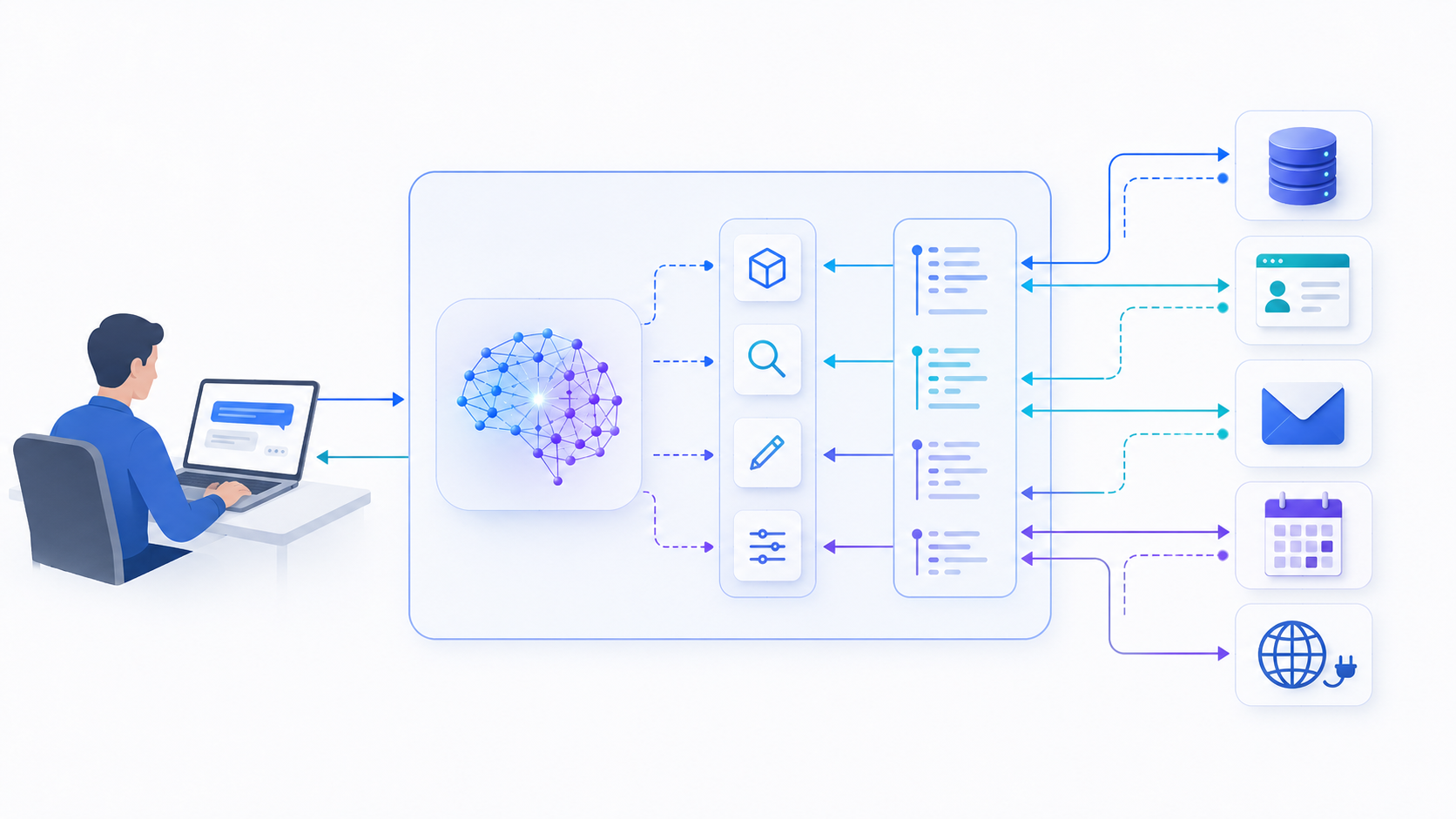
Tool Calling connects a language model with the outside world.
The model receives a description of available tools and can generate structured tool calls. The actual execution is performed by the application.
The fundamental principle is:
User
   ↓
LLM
   ↓
Tool Request
   ↓
Validation
   ↓
Application
   ↓
external System
   ↓
Result
   ↓
LLM
This separation is crucial.
An LLM should not be able to freely access company systems. It should be able to decide within a clearly defined software architecture which of the explicitly provided capabilities are needed for a task.
Thus, Tool Calling forms one of the most important technical foundations for AI workflows, agents, and modern AI integrations.
Would you like to understand these topics systematically and classify them for deployment in your company? In the three-day seminar AI in the Enterprise: From ChatGPT to RAG, Workflows, and AI Agents the most important concepts and architectures are conveyed in a practical manner.