Hybrid Search and RAG Retrieval with Elasticsearch
Vector search is not automatically the best retrieval strategy for RAG. In a small Elasticsearch experiment, we compare classic full-text search, semantic search, and hybrid search.

Bernd Fischer
30. Aug 2026 · 5 min read
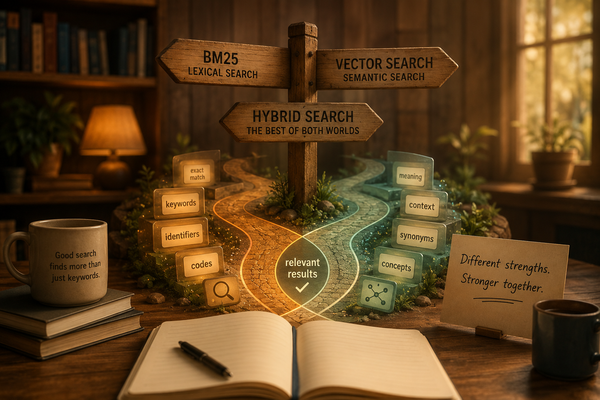
When building a Retrieval-Augmented Generation system, an important architectural question arises quite early:
How do we actually find the documents that we then provide to the LLM?
A common answer today is: Vector search.
We generate embeddings, store them in a vector database, create an embedding for the user query, and then search for the most similar vectors.
That works.
But it does not mean that vector search is automatically the best retrieval strategy.
Classic full-text search is particularly strong for certain tasks, for example with exact terms, identifiers, product codes, or technical designations.
Semantic search has a different strength: it can find relevant documents even when users and documents use different terms.
And then there's hybrid search, which combines both approaches.
Instead of discussing theoretically which approach should be better, I built a small experiment with Elasticsearch.
The full code and all queries used are available in the Elasticsearch Retrieval Lab on GitHub.
The Experiment
The setup is deliberately simple:
- Elasticsearch 9.5
- Python
- 16 documents
- 10 predefined queries
- BM25
- Dense Vector Search
- Hybrid Search with Reciprocal Rank Fusion
all-MiniLM-L6-v2as embedding model
The documents simulate a small internal IT knowledge base of a company.
They cover topics like laptops, remote work, procurement, security incidents, and company policies.
Crucially, the test data intentionally contains conflicts.
For example:
DOC-013
Security incident SEC-443 concerns a stolen company laptop.
The device must be remotely locked and reported to IT security.

DOC-014
Security incident SEC-444 concerns a phishing campaign targeting
company employees. Suspicious messages must be reported immediately.
The two documents are semantically similar.
However, their incident IDs differ.
Other documents deliberately share terms like company, laptop, security, procurement, or policy, although they cover different subjects.
Before comparing the retrieval methods, I also specified for each query which document is expected to appear in first place.
This is important for such an experiment.
Otherwise, there's a risk of retrospectively concocting a convincing explanation why a certain search result could somehow be considered correct.
First: BM25
Elasticsearch already provides a powerful classic full-text search.
For normal text fields, Elasticsearch uses BM25 as the default similarity algorithm.
A simple search looks like this, for example:
response = client.search(
    index="retrieval-lab",
    query={
        "match": {
            "text": query,
        }
    },
    size=3,
)
BM25 does not attempt to capture the meaning of a sentence as an embedding model does.
Instead, it scores documents based on lexical signals. These include term frequency, its rarity across the entire document collection, and document length.
At its core lies one of the fundamental data structures of information retrieval: the inverted index. Some readers might recall this from computer science courses.
Simply put, one can imagine it like this:
laptop      -> DOC-001, DOC-007, DOC-013
security    -> DOC-004, DOC-007, DOC-010, ...
procurement -> DOC-006, DOC-011
This method is extremely useful, but our experiment quickly reveals its limits.
Consider this query:
QUERY: company laptop policy
EXPECTED: DOC-001

BM25:
#1 DOC-016
#2 DOC-007
#3 DOC-001*
The actually sought laptop policy ends up only in third place.
Another example:
QUERY: lost notebook
EXPECTED: DOC-012

BM25:
#1 DOC-009
#2 DOC-016
#3 DOC-012*
And yet another:
QUERY: approval for expensive computer purchase
EXPECTED: DOC-006

BM25:
#1 DOC-009
#2 DOC-006*
#3 DOC-003
BM25 is not doing anything wrong here.
The algorithm does exactly what lexical retrieval was developed for.
The problem is that word matching does not always correspond to the meaning intended by the user.
Adding Vector Search
Next, embeddings come into play.
Each document is transformed into a vector using Sentence Transformers:
model = SentenceTransformer("all-MiniLM-L6-v2")
embeddings = model.encode(document_texts)
The Elasticsearch index receives an additional dense_vector field with 384 dimensions:
"embedding": {
    "type": "dense_vector",
    "dims": 384,
    "index": True,
    "similarity": "cosine",
}
The original text remains stored in Elasticsearch.
This is an interesting architectural point: Elasticsearch can store both searchable texts and their vector representations.
Just because a RAG system works with embeddings, it doesn't necessarily require a separate vector database.
For a search, the user query is also transformed into a vector. Then Elasticsearch performs a k-nearest neighbors search to find similar document vectors.
Vector Search Solves Semantic Cases
The results change immediately.
For the three examples where BM25 did not place the expected document first, the situation is as follows:
company laptop policy
BM25:   #3 DOC-001*
VECTOR: #1 DOC-001*

lost notebook
BM25:   #3 DOC-012*
VECTOR: #1 DOC-012*

approval for expensive computer purchase
BM25:   #2 DOC-006*
VECTOR: #1 DOC-006*
This is exactly why semantic retrieval is so interesting for RAG.
The user's phrasing does not have to match the terms in the source document exactly.
A user might search, for example, for
approval for expensive computer purchase
, while the document speaks of
Hardware purchases above €2,000 require approval
.
Semantically these statements are close, although they use different words.
Up to this point, one might conclude:
Vector search wins.
Then I searched for exact identifiers.
Where Vector Search Fell Short
The most interesting query of the entire experiment was surprisingly short:
SEC-443
There is exactly one correct document:
DOC-013
Security incident SEC-443 concerns a stolen company laptop.
BM25 handles this without issue:
BM25:
#1 DOC-013*
#2 DOC-010
#3 DOC-004
Vector search, however, does not:
VECTOR:
#1 DOC-014
#2 DOC-013*
#3 DOC-010
The wrong security incident is ranked first.
DOC-014 describes SEC-444, not SEC-443.
A look at the vector scores clarifies the problem:
DOC-014 SEC-444   0.7615
DOC-013 SEC-443   0.7353
DOC-010 SEC-442   0.7287
All three documents describe security incidents and are therefore semantically in a similar context.
For us humans, the difference between SEC-443 and SEC-444 is absolutely crucial.
For the embedding model used, the identifier was not a strong enough signal to reliably place the correct document at the top.
This explicitly does not mean that vector search cannot handle identifiers in principle.
Another query worked smoothly:
QUERY: SEC-444

VECTOR:
#1 DOC-014*
#2 DOC-010
#3 DOC-013
Here, too, POL-102 was found correctly.
So the insight is somewhat more nuanced:
Semantic similarity does not guarantee an exact identifier match.
This can be extremely important in real RAG applications.
For example, those often involve:
- Ticket numbers
- Product IDs
- Contract numbers
- Error codes
- API designations
- Version numbers
- Paragraphs or other references
If SEC-444 is semantically very similar to SEC-443, that helps little if the user explicitly asked about SEC-443.
Hybrid Search
At this point, the strengths of both retrieval approaches complement each other quite well.
BM25 is strong when exact lexical information matters.
Vector search is strong when the user's language deviates from the phrasing in the document.
So why not use both results?
This is exactly where hybrid search comes in.
Elasticsearch supports this, among other things, via Reciprocal Rank Fusion (RRF).
Simply put, the process looks like this:
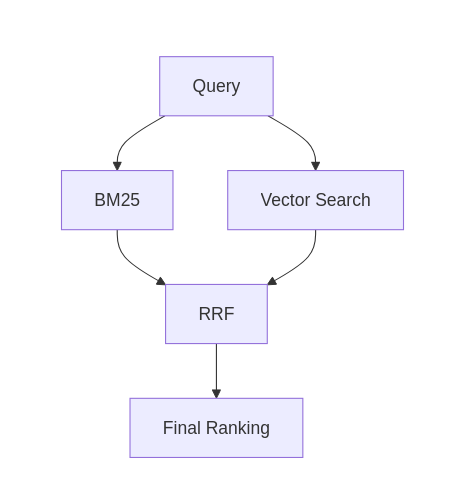
Hybrid retrieval combines lexical BM25 search with semantic vector search and merges the rankings with reciprocal rank fusion.
RRF is especially practical here because BM25 scores and vector similarity scores are not directly comparable.
Instead of trying to combine completely different scoring scales directly, RRF works with the rank positions of each retriever.
Simply put, the idea is:
RRF(document) = sum(1 / (k + rank))
A document that appears near the top in multiple retrieval methods thus receives a stronger combined ranking.
And now SEC-443 becomes especially interesting:
QUERY: SEC-443
EXPECTED: DOC-013

BM25:   #1 DOC-013* | #2 DOC-010 | #3 DOC-004
VECTOR: #1 DOC-014  | #2 DOC-013* | #3 DOC-010
HYBRID: #1 DOC-013* | #2 DOC-014 | #3 DOC-010
These four lines actually summarize the experiment quite well.
Vector search prefers the wrong, but semantically very similar, security incident.
BM25 delivers the strong lexical signal for the exact identifier.
RRF combines both rankings and brings the correct document back to first place.
A Small Surprise Regarding the Elasticsearch License Model
There was a practical surprise when setting up the experiment.
My Elasticsearch container initially ran with the Basic license.
BM25 worked.
Dense vectors worked.
kNN vector search worked.
But the native RRF retriever did not.
Elasticsearch responded with:
security_exception:
current license is non-compliant for
[Reciprocal Rank Fusion (RRF)]
For the experiment, I switched the local Elasticsearch container to a Trial license and recreated the data volume.
That enabled the use of the native RRF retriever.
This is a detail to keep in mind when planning an Elasticsearch-based hybrid retrieval architecture: the technical capabilities are fundamentally available in Elasticsearch, but the concrete retrieval functions available also depend on the license used.
An alternative would be to execute BM25 and vector search separately and implement rank fusion in the application itself.
For this experiment, however, I deliberately used Elasticsearch's native RRF implementation.
The Result
For the ten predefined queries, it was checked how often the expected document actually ranked first.
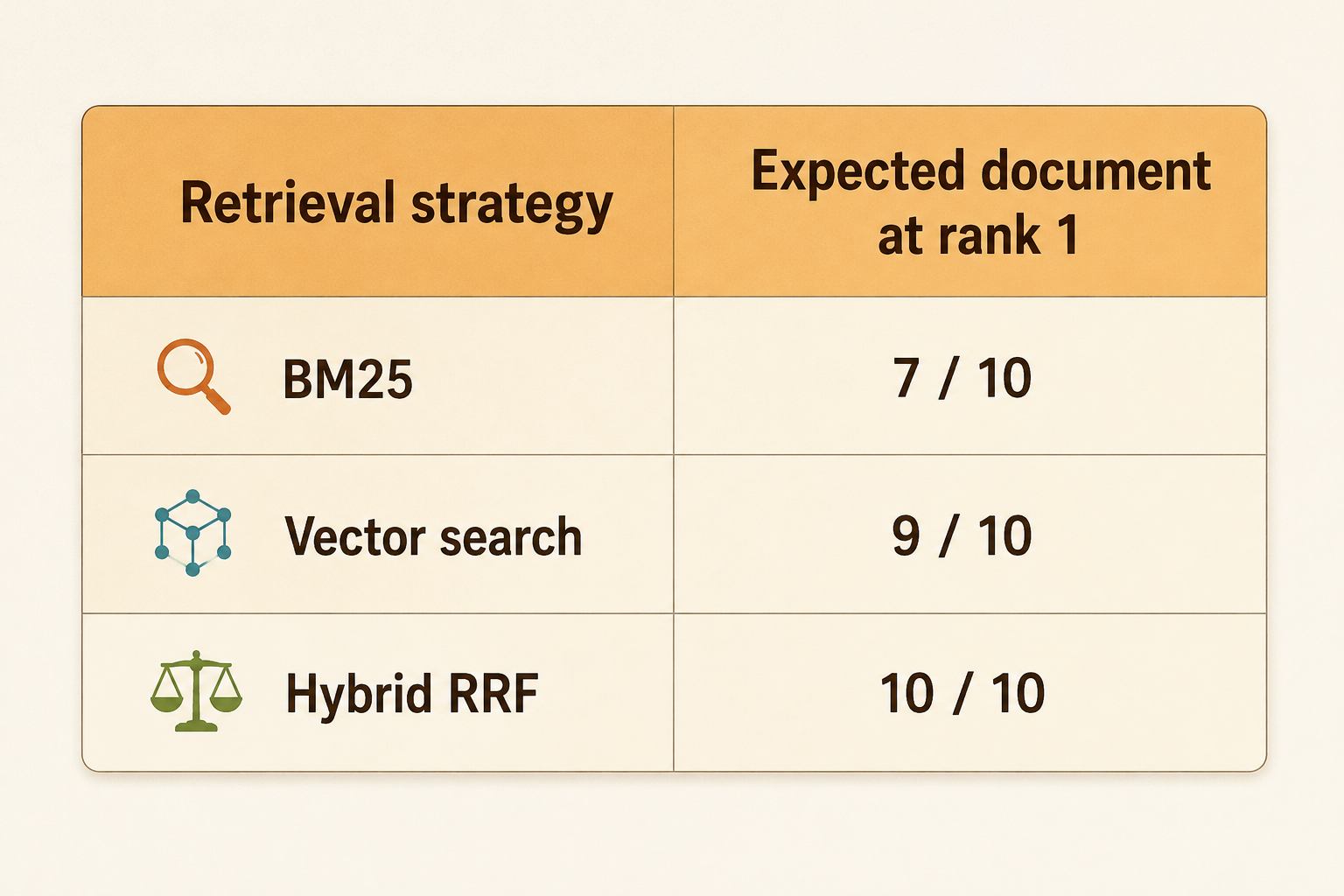
These numbers are not a benchmark.
Sixteen handmade documents and ten queries obviously do not allow the conclusion that vector search is generally 90% correct or that hybrid search is always superior.
That would be a massive over-interpretation of this small experiment.
More interesting are the different error patterns.
BM25 failed multiple times where lexical matching did not reflect the intended meaning.
Vector search solved these cases but delivered the wrong document first for an exact incident identifier.
Hybrid search combined both signals and, in our small experiment, placed the expected document first in all ten queries.
Another interesting observation:
In nine out of ten vector search results, hybrid search could not improve the first place at all.
There was nothing to improve.
The benefit of hybrid search became visible exactly when the two retrieval signals contradicted each other.
What Does This Mean for RAG?
When designing a RAG system, I would therefore not start with this question:
Which vector database should we use?
But rather with:
What types of documents and queries must our retrieval system actually handle?
If users search for concepts in natural language and use different formulations than the source documents, semantic retrieval can be enormously valuable.
If the document collection instead contains exact identifiers, technical terms, error codes, product names, or other strong lexical signals, classic full-text search remains very valuable.
And when a system needs both, hybrid retrieval becomes interesting.
Above all, one should test the quality of the retrieval independently from the LLM.
A RAG system can use an excellent language model and still produce poor answers if the correct document never reaches the model.
Retrieval is not just the technical feed into the LLM.
It is an essential component of the overall system quality.
And sometimes the best retrieval strategy is not to replace the old search technology with the new.
But rather to let both do what they do best.