Speeding Up JSON Serialization in Python
JSON serialization plays a crucial role in the performance of web applications, especially when transferring data in and out of APIs. Python’s built-in JSON library is convenient and powerful, but it can quickly reach its limits with larger datasets.

Bernd Fischer
10. Nov 2024 · 4 min read
Introduction to JSON Serialization
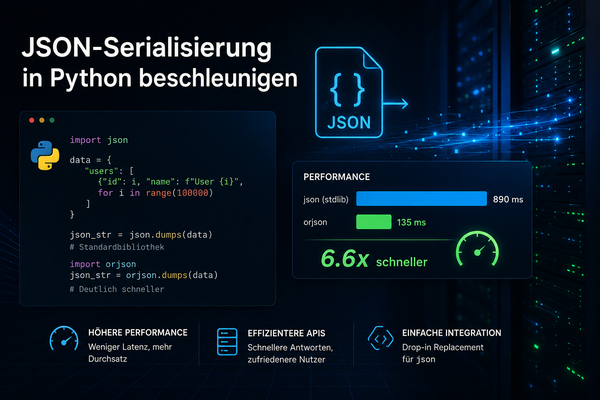
JSON (JavaScript Object Notation) is a widely used format for exchanging structured data. It is supported by both the standard library and orjson. The standard library (json) is integrated into Python and offers solid performance and compatibility. orjson, on the other hand, is a third-party library specifically optimized for speed and efficiency.
Why Speed Matters
Serialization converts Python data structures (like dictionaries and lists) into JSON format. This process can take a significant amount of time with large datasets. Especially web applications that send large amounts of data simultaneously to many users greatly benefit from faster serialization.
Performance Comparison: Standard JSON vs. orjson
To measure the performance of the two libraries, we created a simple benchmark. First, we install orjson:
# Installiere orjson
pip install orjson
Here is the benchmark code we use:
import json
import orjson
import timeit

# Beispiel-Datenstruktur (große Menge an Daten)
data = {
    "items": [
        {
            "id": i,
            "name": f"Item {i}",
            "price": i * 1.99,
            "in_stock": True,
            "tags": ["sale", "popular", "new"],
        }
        for i in range(1_000_000)  # Erstelle 1.000.000 Einträge
    ]
}

# Funktion für Standard-JSON-Serialisierung
def standard_json_serialization():
    return json.dumps(data)

# Funktion für orjson-Serialisierung
def orjson_serialization():
    return orjson.dumps(data)

# Performance-Messung
standard_time = timeit.timeit(standard_json_serialization, number=10)
orjson_time = timeit.timeit(orjson_serialization, number=10)

print(f"Standard JSON serialization time: {standard_time:.4f} seconds")
print(f"orjson serialization time: {orjson_time:.4f} seconds")
Explanation of the Code
- Installing
orjson: Ensure thatorjsonis installed by runningpip install orjson. - Data Structure: We create a large data structure (
data) with 1,000,000 items. Each item has fields likeid,name,price,in_stock, andtags. This structure represents the kind of data often used in APIs. - Serialization Functions: The functions
standard_json_serializationandorjson_serializationuse the standard library (json.dumps) andorjsonto serialize the data. - Performance Measurement: The
timeitmodule measures the execution time for each function by running serialization 10 times. The measured times are output to compare the efficiency of both approaches.
Benchmark Results
Here are the results from this test:
Standard JSON serialization time: 12.7097 seconds
orjson serialization time: 1.3026 seconds
The orjson library serializes data almost 10 times faster than the standard library. This difference is significant and can have a major impact on performance, especially when large amounts of data are regularly transferred.
Why is orjson Faster?
orjson was developed in Rust, a programming language known for its efficiency and speed. It is optimized for maximum performance and utilizes modern CPU architectures. Additionally, orjson reduces overhead in converting Python data structures to JSON, making it significantly faster than the standard library.
When Should You Use orjson?
Although orjson offers impressive speed advantages, there are specific scenarios where its use is more suitable:
- Large Datasets:
orjsonis particularly worthwhile when dealing with large or complex JSON data structures. - Real-time Applications: For web applications that access large datasets in real-time, such as processing data streams.
- Data-intensive APIs: REST or GraphQL APIs that send large amounts of data to clients benefit greatly from fast JSON serialization.
Potential Limitations and Compatibility
Although orjson provides excellent performance, there are some considerations:
- Incompatibility with Older Python Versions:
orjsononly works with Python 3.7 or higher. - Limitations with Certain Data Types: Some Python data types (e.g.,
Decimal) are not natively supported and require custom handling. However, these limitations can often be addressed with additional settings or adjustments.